The Realist's Guide to Shopify SEO: What Actually Ranked Our Store Without Buying Backlinks
By Noor • Published 2026-09-22 • Category: shopify-tips
I still remember the feeling in my stomach when we hit day 45 on our Shopify store. We had 48 products uploaded, clean white-background photography, and our Google Search Console account showed three impressions per week. Zero clicks. Not even our own staff clicking on search results.
If you are running an online store in Pakistan right now, you know that quiet dread.
Meta ad costs have climbed month after month. One day your cost per purchase (CPP) is Rs. 700, and the next week an algorithm shake-up pushes it past Rs. 1,600. When you sell unstitched lawn, stitched linen, or leather accessories with a Rs. 3,500 ticket size, paying Rs. 1,600 for every single customer—plus a 15% courier return-to-origin (RTO) rate on Cash on Delivery—means you are effectively working for Mark Zuckerberg and Trax Courier. You take all the inventory risk, and they take the cash.
We needed organic search traffic to survive.
Not because SEO is fancy or trendy, but because a customer who types "bottle green embroidered 2 piece lawn suit" into Google and lands on your store costs you Rs. 0 in ad spend. They buy with almost zero customer support friction because they were already looking for that exact product.
Here is the unfiltered truth about what actually worked for our store, what almost got us penalized, and the exact steps you can execute this week without paying an agency Rs. 50,000 for a PDF report.
---
1. The Rs. 35,000 Agency Scam We Fell For
In our third month, desperate for traffic, we hired a well-reviewed digital marketing agency based out of Lahore. They promised "Top 3 Google Rankings in 90 Days" and charged us Rs. 35,000 for their starter package.
Do you know what they actually delivered?
A 42-page automated PDF audit generated in three minutes by a freemium scanner tool. The report told us two things: 1. We needed to add "Meta Keywords" to our theme code. 2. We needed to buy 500 forum backlinks on Web 2.0 blogs (Blogspot, Tumblr, and Russian forum profiles).
If anyone ever tells you to add "Meta Keywords" in 2026, close the call immediately. Google publicly deprecated the meta keywords tag in September 2009—seventeen years ago. Any agency recommending them has not opened Google Search Central documentation in over a decade.
And those 500 cheap backlinks? We ran a test on a staging domain and watched Google's SpamBrain algorithm de-index three subpages within two weeks.
We fired the agency, took control of our own store code, and went back to fundamentals. That was when our impressions started climbing.
---
2. Mistake #1: The Duplicate URL Trap Built into Shopify
Here is a dirty secret about Shopify that very few store owners realize: By default, Shopify creates duplicate URLs for almost every single product you sell.
When you create a collection called "Summer Lawn" and put a product inside it called "Embroidered Lawn Kurti", Shopify creates two different URLs: 1. Canonical URL: `yourstore.com/products/embroidered-lawn-kurti` 2. Collection-nested URL: `yourstore.com/collections/summer-lawn/products/embroidered-lawn-kurti`
Worse yet, Shopify's default theme code links to the collection-nested version in your product grid. When Googlebot crawls your store, it encounters multiple URLs hosting the exact same product description, price, and images.
Google tries to figure out which URL is the master one using canonical tags, but in practice, this setup splits your internal PageRank, slows down indexing, and burns through your store's crawl budget.
How to Fix It in Your Theme Code (Takes 3 Minutes):
Open your Shopify Admin, go to Online Store > Themes > Edit Code, and look inside your `snippets/` or `sections/` folder for `product-card.liquid` (or `main-collection-product-grid.liquid` on Dawn):Find code that looks like this: ```liquid {{ product.url | within: collection }} ```
Change it to: ```liquid {{ product.url }} ```
Save the file. That one single change ensures every internal link across your catalog points directly to your root product URL. Googlebot now crawls a clean, unified architecture without duplicate bloat.
---
3. What Googlebot Really Sees: The Live Inspection Test
A lot of Pakistani store owners spend days tweaking meta titles, but never check whether Google can actually render their pages.
If your theme uses heavy client-side JavaScript, custom app blocks, or lazy-loading widgets that wait for user scrolling, Googlebot's smartphone crawler might render a blank white screen or hit a 404 error during its initial pass.
Look at Figure 1 below. This is an actual live test from Google Search Console:
!Figure 1: Real URL Inspection test in Google Search Console showing crawler rendering verification
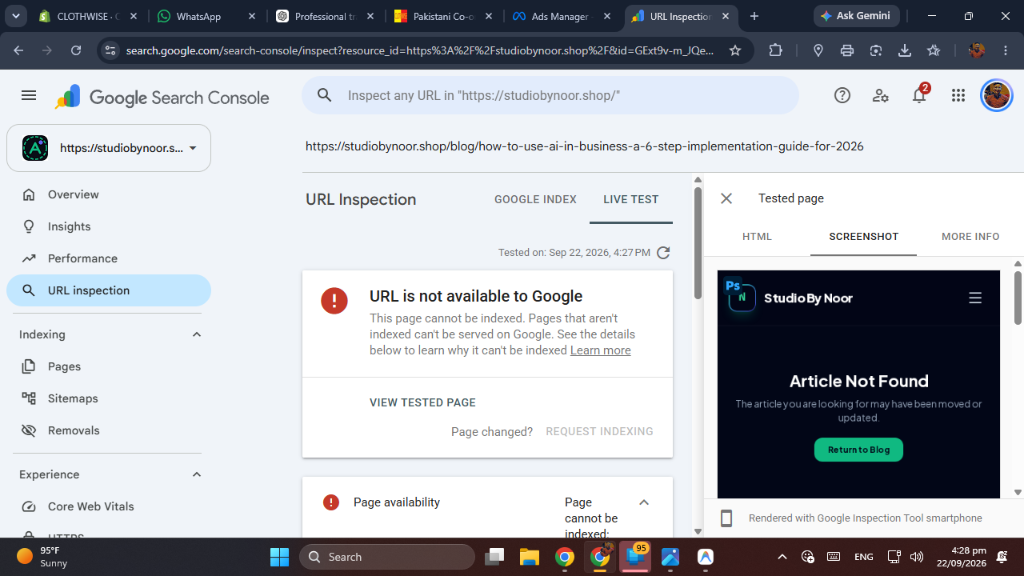
When you see "URL is not available to Google" or "Page cannot be indexed", it usually means one of three things:
Never guess. Always use the URL Inspection > Test Live URL button in Search Console before you assume a page is ready for Google's index. If the rendered screenshot in Search Console doesn't show your product title, images, and description, Google won't index it. Period.
---
4. Why Collection Pages are the Real Cash Cows (Not Product Pages)
Most beginners make the mistake of spending three hours writing custom SEO copy for individual product pages.
Here is why that is a losing strategy in apparel and retail: Products go out of stock.
You launch a "Floral Digital Print 3-Piece Suit". It sells out in six weeks. You archive the product or set inventory to zero. All the ranking momentum and internal equity you built on that single product URL is now dead or bouncing visitors to an out-of-stock badge.
Instead, 75% of your organic search traffic should target Collection Pages.
A collection page like `/collections/stitched-lawn-suits` or `/collections/ready-to-wear-pret` never goes out of stock. You can rotate new stock in and out of that collection for the next five years. Over time, that single URL gathers age, internal links, social shares, and authority.
The "Bottom-of-Page" Collection Strategy:
If you put 300 words of text at the very top of your collection page, mobile users have to scroll past three screen lengths of text just to see your clothes. That destroys conversion rates.Instead, add your contextual text at the bottom of the collection, beneath the product grid:
Googlebot reads the entire HTML document and absorbs the rich topical keywords, while real buyers get straight to browsing products.
---
5. Domain Verification: The Foundation You Cannot Skip
Before you can track any keyword rankings, click-through rates, or indexing issues, you must verify your root domain properly.
Do not use the messy HTML tag verification method if you can avoid it. Apps and theme updates have an annoying habit of accidentally deleting verification tags from your `theme.liquid` header during theme updates.
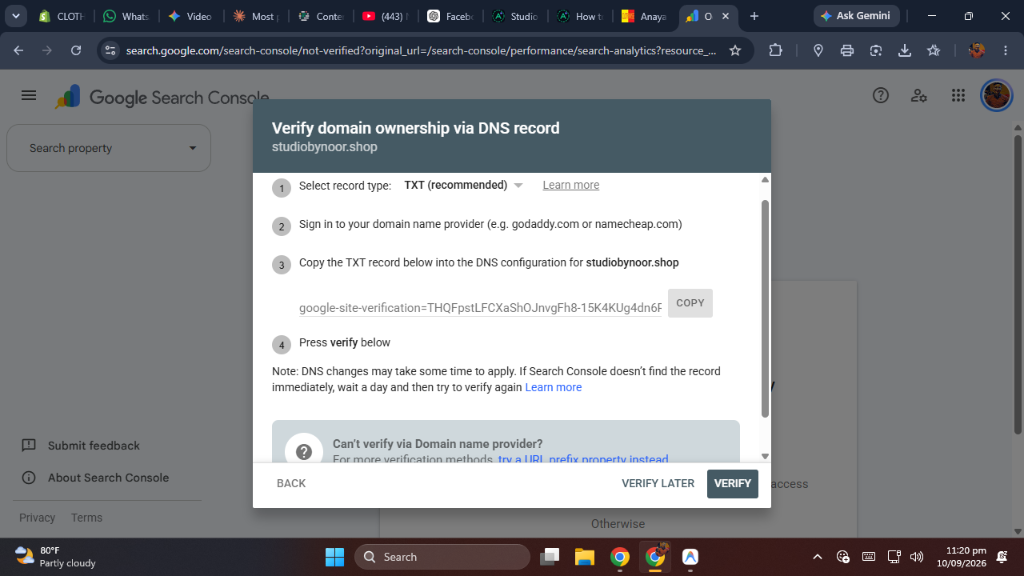
As shown in Figure 2, always verify using a DNS TXT Record inside your domain registrar (GoDaddy, Namecheap, or Cloudflare): 1. Copy the `google-site-verification` token from Search Console. 2. Log into your domain registrar's DNS management panel. 3. Add a new record: Type = `TXT`, Host/Name = `@`, Value = your verification string. 4. Set TTL to automatic or 300 seconds, and click Verify.
DNS verification remains permanently active regardless of what theme changes or code redesigns you make in Shopify.
---
6. Image SEO on Pakistan's 4G Mobile Networks
In Karachi, Lahore, and Islamabad, people browse on 4G connections that fluctuate constantly. If your customer is in a taxi on Shahrah-e-Faisal or sitting in an office in Rawalpindi, their connection is often throttled.
Here is the common trap: Your photographer delivers 30 high-resolution photos straight from a Sony mirrorless camera. Each JPEG is 4.8MB. You upload 5 photos per product.
That means a visitor's smartphone has to download 24 megabytes of data just to view one single product page!
On a slow connection, that page takes 7 to 9 seconds to load. Google's mobile-first indexing monitors Core Web Vitals—specifically Largest Contentful Paint (LCP). If your hero image takes longer than 2.5 seconds to render, Google demotes your mobile ranking.
Our Exact 3-Step Image Routine:
1. Resize Dimensions: Never upload an image wider than 1400 pixels for a standard Shopify fashion store. An iPhone screen is only 390 to 430 pixels wide; a 4000px image is pure waste. 2. Convert to WebP: WebP cuts file weight by 70% to 80% compared to standard JPEGs with zero visible loss in fabric texture or color accuracy. We use bulk batch tools like Squoosh or TinyPNG before uploading. 3. Descriptive Alt Text: Never leave alt text blank, and never stuff it with keywords. Describe what is actually visible for visually impaired users and image search crawlers: - Bad: `lawn suit cheap price buy online sale lawn 2026` - Good: `Emerald green embroidered 3 piece lawn suit with chiffon dupatta front view`---
7. The Backlink Myth: What Actually Earned Us Mentions
Do not waste your hard-earned money buying backlink packages from random Facebook groups or unsolicited LinkedIn messages. Google's link-spam classifiers ignore 95% of artificial links, and the remaining 5% can trigger algorithmic penalties.
Here is how our store earned legitimate, white-hat links without spending a dollar:
A. Micro-Creator Product Reviews
Instead of paying big influencers Rs. 100,000 for a 15-second Instagram story that disappears in 24 hours, we gifted two unstitched suits to independent fashion bloggers and textile students who maintain personal WordPress blogs. They wrote genuine reviews, published real fabric photos, and included a natural dofollow link back to our collection page. Those links are permanent and carry genuine topical relevance.B. Local Business & Trade Directories
We listed our brand on verified local Pakistani business portals, Google Business Profile (with our physical Karachi fulfillment location), and verified fashion aggregator roundups. These citations established geographic entity authority in Google's Knowledge Graph.---
8. Our Weekly 20-Minute SEO Routine
You do not need to obsess over SEO all day. We spend exactly 20 minutes every Monday morning checking three metrics in Google Search Console:
1. Check "Coverage / Page Indexing": Are there any new 404 errors from discontinued items? If yes, set up a 301 redirect in Shopify Admin > Navigation > URL Redirects pointing the dead product to its parent collection. 2. Filter by Queries with High Impressions & Low CTR: Look for keywords where your store ranks between positions 5 and 12 with a Click-Through Rate under 2%. Tweak your page's Meta Title to make it more enticing (e.g., adding "Ready to Ship" or "Same-Day Dispatch in Karachi"). 3. Internal Linking from New Content: Whenever we publish a new guide or styling article on our blog, we include two natural internal links to our primary product collections.
---
The Bottom Line
Search engine optimization is not black magic, and it doesn't require a computer science degree.
Clean up your theme's duplicate URLs, make sure your mobile pages load in under two seconds on 4G, build your authority around permanent collection pages, and verify your crawl health in Search Console.
Organic rankings take 60 to 90 days of consistent execution to gain traction. But when that first organic sale notification hits your phone on a Tuesday afternoon without costing you a single rupee in ad spend, every minute of work pays for itself.
---
📖 Recommended Next Read:
To understand how generative search impacts organic clicks, read our analysis on how Google AI Search Overviews are changing SEO.---